
Car stunt
About 14 seconds · Landscape
A car photo becomes a Roadster AI video with the full ramp, flip and smoky landing.
Create a Roadster AI video from one car photo: a ramp climb, mid-air flip and smoky landing.
Your Roadster AI video will be silent
Your Roadster AI video has no music, voices or sound effects. Add your own audio in TikTok, Reels or a video editor.
Your photo guides the appearance of your Roadster AI video; the built-in reference guides the ramp climb, flip and landing.
The Roadster AI video demo above was generated with this tool. Your result will vary with the uploaded image; check the subject and movement before sharing.
Track your Roadster AI video in My creations. Avoid submitting again while it is processing.
JPG, PNG, WebP · Up to 20 MB
Photos are checked when you generate, before credits are charged
Cars, bicycles, carriages and skateboards. Watch the same stunt with a different subject.
About 14 seconds · Landscape
A car photo becomes a Roadster AI video with the full ramp, flip and smoky landing.
About 15 seconds · Landscape
This Roadster AI video follows a bicycle and rider through the same stunt.
About 14 seconds · Landscape
A carriage takes on the airborne sequence in this Roadster AI video.
About 14 seconds · Landscape
A skateboarder brings a different take to the jump and landing in this Roadster AI video.
Selected Roadster AI video results created by users. Results vary with the uploaded image; generated videos are silent.
Create my Roadster AI videoCreate a Roadster AI video in three steps: upload your photo, choose output quality and download the result.
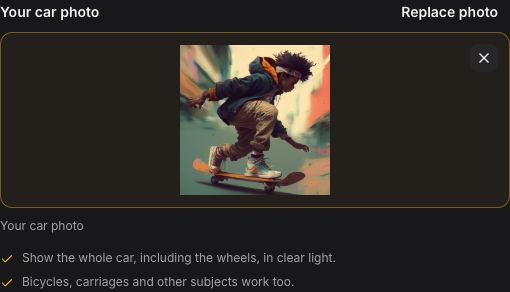
For your Roadster AI video, upload one clear photo with the whole car and its wheels in frame. Bicycles, carriages and other subjects work too. Avoid blur or objects covering the subject.
JPG, PNG, WebP · Up to 20 MB
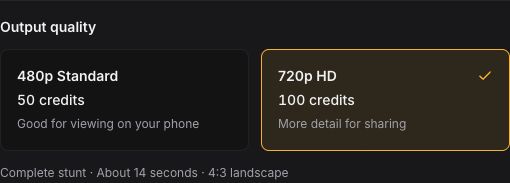
Choose 480p for 50 credits or 720p for 100. Confirm image permission, then generate your Roadster AI video. Both quality options use the same built-in stunt.
About 14 seconds · 4:3 landscape · Silent
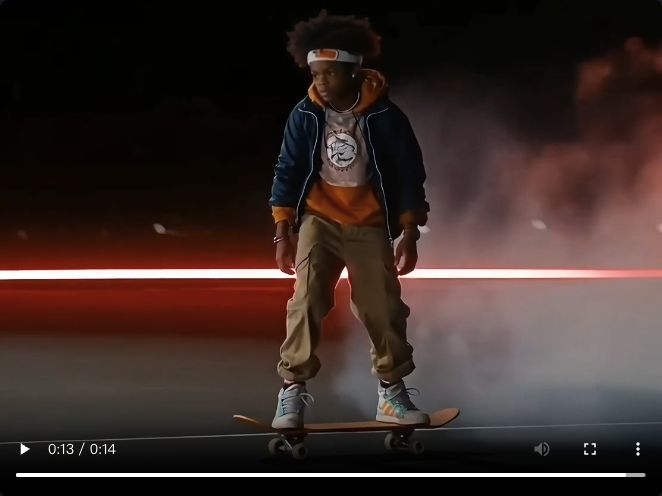
Find your finished video here or in My creations. Download it promptly, check the full sequence and add music in TikTok, Reels or your editor before posting.
Preview · Download · Add your own audio
The Roadster AI video prompt and stunt reference are built in; you only need your photo.
Upload my photoFrame from a user-generated Roadster AI video featuring a carriage.
A Roadster AI video turns your photo into a ramp climb, mid-air flip and smoky landing. Your image guides appearance; the built-in reference guides the scene and camera movement.
Use a sharp photo of a car, bicycle or carriage for your Roadster AI video. No stunt pose or matching background is needed; keep the whole subject clearly visible.
Each clip is about 14 seconds in 4:3 landscape, at 480p or 720p. Output is silent; add music or sound effects when sharing. Review the complete motion before posting.
A Roadster AI video uses 50 credits at 480p or 100 credits at 720p. Packs start at $6.99. Pay once, with no subscription; purchased credits never expire.
The reference shows the target effect; generated results can vary. Review the photo tips and effect notes before purchasing.
50 credits for 1 Standard video (480p).
One-time purchase · Credits never expire
Your pack includes
100 credits for 1 HD video (720p), or 2 Standard videos (480p).
One-time purchase · Credits never expire
Your pack includes
200 credits for 2 HD videos (720p), or 4 Standard videos (480p).
One-time purchase · Credits never expire
Your pack includes
300 credits for 3 HD videos (720p), or 6 Standard videos (480p).
One-time purchase · Credits never expire
Your pack includes
Questions about payments or credits? Read the pricing FAQ
Secure checkout
Available payment methods are shown at checkout.
Answers about supported photos, video quality, credits and downloads.
A Roadster AI video turns one photo of your car into a complete stunt: up the ramp, through a mid-air flip and down to a smoky landing. Your photo guides the appearance; the fixed reference guides the scene, camera and action timing.
For a Roadster AI video, upload one clear image of your car, vehicle or other subject. Keep the whole subject and the details you want to retain in frame, including the wheels for a vehicle. For people, use a clear full-body photo with permission. JPG, PNG and WebP are supported, up to 20 MB. No stunt pose or matching background is needed.
No. Every Roadster AI video uses the built-in prompt and stunt reference. Upload your subject image, choose output quality and review the credit cost. This template does not accept custom prompts or uploaded reference videos.
Yes. A Roadster AI video can feature a car, bicycle, carriage or another clearly visible subject. Include the whole vehicle if you want it in the video. If the image has no vehicle, generation is instructed to remove the original vehicle and use movement suited to your subject. If people appear, use their photo with permission.
A Roadster AI video is about 14 seconds in 4:3 landscape. Choose Standard 480p or HD 720p. Videos are silent, with no music, voices or sound effects. Download the result and add your own audio when posting.
A Roadster AI video requires purchased credits; there are no free generated previews. You can watch the built-in stunt reference and user-generated sample clips before buying. Standard 480p uses 50 credits; HD 720p uses 100. Credit packs are one-time purchases with no subscription or automatic renewal, and purchased credits never expire. See Pricing for current pack prices.
A Roadster AI video can vary in appearance and motion. Your photo guides the car’s appearance, but details and complex motion may change. Watch the full clip and check the body, wheels, shadows, flip and landing before sharing. A clear photo provides better visual information; it does not guarantee a perfect match.
Credits are returned when a Roadster AI video task is confirmed failed. A waiting timeout or a lost connection does not necessarily mean failure. Continue checking the existing task in My creations instead of submitting again. Contact support if the task remains unresolved.
Maintained by Roadster ai · Updated
Product details are documented in our guide. YouTube Shorts requires a square or vertical video, so reframe the landscape download before uploading as a Short.
Upload one photo and create your own ramp-jump and flip video. Choose output quality, generate the complete stunt and download it for sharing.